AI Agents
Hire a salesperson. Hire a solutions engineer. Hire an onboarding coach. Hire them all in an afternoon, and have them on duty 24/7 by sundown.
An AI Agent in Turing ES is the specialist you don't have to recruit, train, or replace. It's a small, named bundle of:
- a brain — an LLM Instance you've already configured,
- a set of hands — native tools and MCP servers that let the agent actually do things (search your content, fetch live data, run code),
- a voice — a Persona that aligns the answers with your brand, your funnel stage, and your compliance posture.
Each agent appears as its own tab in the Chat interface. Visitors pick the specialist that matches their need; agents stay in their lane.
Configure agents in Administration → AI Agents.
What "Agent" Actually Means
The word "agent" is overloaded. In Turing ES, an Agent has two non-negotiable properties:
- It's a composition, not a model. You're not picking a model from a marketplace and renaming it. You're combining decisions — which LLM, which tools, which voice — into a single, deployable unit. Change any of the three, and you've changed the agent.
- It can act, not just answer. The defining feature of an agent over a plain chatbot is its ability to call tools — search a knowledge base, look up a stock quote, run a Python script, query an MCP server. The model doesn't just generate words; it requests an action, Turing ES executes it, and the model reasons over the result.
Together, these mean an agent is a business process expressed as a conversation. A user asks; the agent searches your documentation, fetches their account data, summarizes the answer, and books a follow-up — in one exchange.
Composition: The Four Layers
An AI Agent is built from four layers. Get all four right and the agent feels like a senior team member; get any one wrong and it feels like a generic chatbot.

1. Identity
| Field | Description |
|---|---|
| Name | Display name shown as the tab label in the Chat interface. "Sales Concierge" beats "Agent #3". |
| Avatar | Profile image. Even a small one moves trust meters — visitors react to faces, even illustrated ones. |
| Description | One-line explanation of the agent's purpose. Shown in admin lists; hints visitors what to expect. |
| Enabled | Toggle to activate or hide the agent. Disabled agents do not appear in the Chat interface. |
2. Brain
The LLM Instance is the agent's reasoning engine. You can attach one or more instances; at chat time the user (or front-end) picks which one to run.
Why multiple? Because the cost/quality tradeoff varies by question:
- A trivial routing question doesn't need a frontier model. Attach a fast, cheap instance (e.g., Gemini Flash, GPT-4o-mini) and let users default to it.
- A complex multi-step deal qualification benefits from a top-tier reasoner. Attach Claude Sonnet alongside, as an opt-in upgrade.
See LLM Instances for vendor support, default models, and provider-specific options.
3. Capabilities
This is the largest configuration surface. Two sets of capabilities can be attached:
Native tools — 27 first-party tools, grouped into 8 categories:
| Category | Tools | When to attach |
|---|---|---|
| Semantic Navigation | list_sites, search_site, get_document_details, find_similar_documents, search_by_date_range, get_site_fields, get_valid_filter_values, … (15 total) | The agent should answer using your indexed enterprise content (CMS pages, products, internal documentation) |
| RAG / Knowledge Base | search_knowledge_base, list_knowledge_base_files, get_file_content, knowledge_base_stats | The agent should answer using files in Assets (PDFs, Word docs, manuals) |
| Web Crawler | fetch_webpage, extract_links | The agent should be able to read a public URL on demand (e.g., reference a customer's website) |
| Finance | get_stock_quote, search_ticker | Investor-facing or financial-research agents |
| Weather | get_weather | Travel, logistics, field-service agents |
| Image Search | search_images | Marketing, content-creation agents |
| Date / Time | get_current_time | Any agent that books, schedules, or references "now" |
| Code Interpreter | execute_python | Data analysis, chart generation, technical agents |
MCP Servers — external tool servers the agent can call:
| Badge | Transport | Typical use |
|---|---|---|
| HTTP (blue) | SSE over HTTP | A REST API your team owns; a brand-context server; a CRM lookup |
| COMMAND (amber) | stdio | A local script or process — useful for filesystem or shell access on the host |
See Tool Calling for the full native tool reference and MCP Servers for connection setup.
A common mistake: attaching every tool because "it might be useful". Every additional tool consumes prompt tokens to describe to the model, and forces the model to choose among more options. Fewer, sharper tools produce more precise tool calls and shorter latencies. Start with 3–5 tools per agent and add only what an actual user request demanded.
4. Voice
The Persona field attaches a Persona to the agent. The persona overlays:
- a system instruction (brand voice directive),
- tone, verbosity, language style,
- mandatory + forbidden vocabulary (enforced both pre- and post-LLM),
- optional few-shot examples retrieved from a vector store,
- optional live brand context from an MCP.
A persona is optional. An agent without one uses the LLM's default voice. For internal tools that's fine; for any customer-facing agent it's almost always wrong.
How an Agent Actually Runs
When a user sends a message, this loop runs end-to-end. Understanding it is the difference between debugging "the AI gave a weird answer" in five minutes vs. five hours.
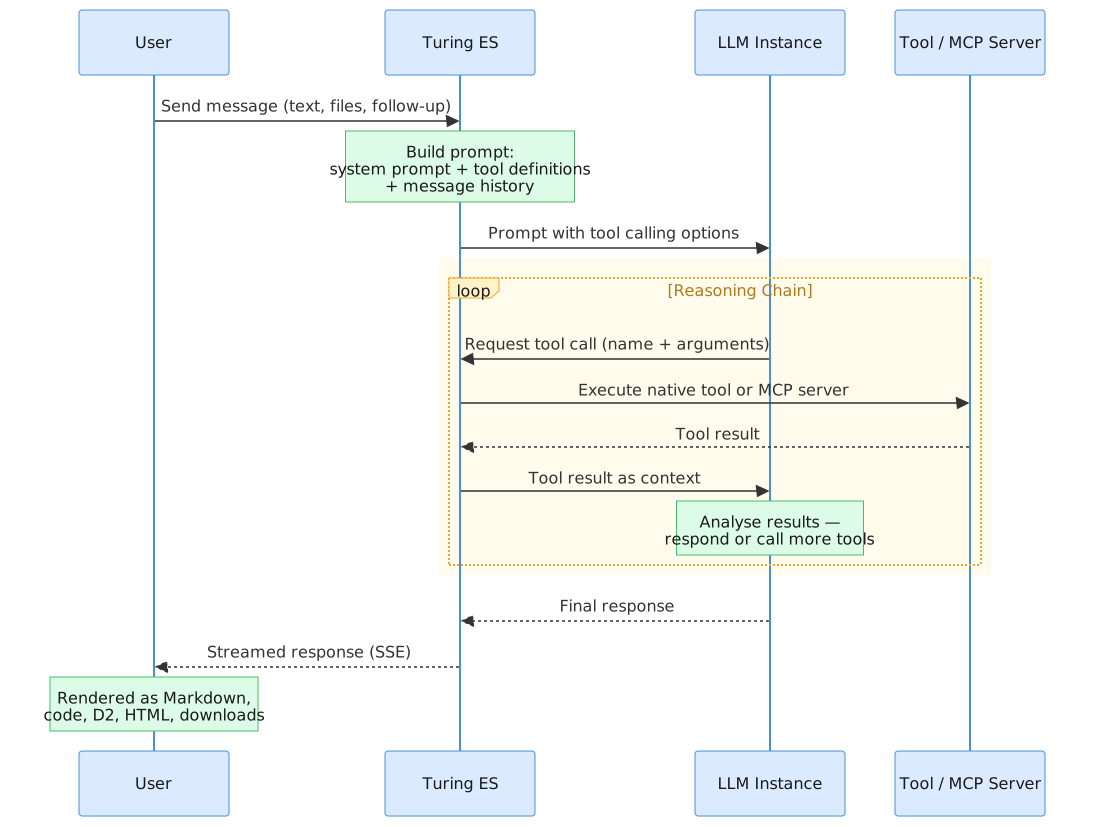
Step 1 — Prompt assembly
Turing ES builds the prompt in this exact order:
- Persona system instruction (if a persona is attached)
- Style guidelines block — derived from the persona's tone + verbosity + language style
- Mandatory / forbidden vocabulary lists (if any)
- Brand context — fetched from the persona's MCP server, if configured
- Agent system prompt — the agent's own purpose-specific instruction
- Tool definitions — JSON schemas for every native tool and MCP tool the agent has access to
- Few-shot examples — top-K Q/A pairs retrieved by similarity from the persona's few-shot store, if configured (only on the first user turn)
- Conversation history — full message log so far
- Current user message
Layers 1–6 don't change per turn after the first message. Spring AI, the underlying integration, handles the assembly; you don't write any of this manually.
Step 2 — LLM inference
The assembled prompt goes to the LLM Instance the user picked. The model receives it and decides one of two things:
- Respond directly — when the answer doesn't need any tool. Common for chit-chat, restated questions, simple factual recall.
- Request a tool call — when the answer requires action. The model emits a structured request: tool name + arguments.
This decision is the agent's "thinking step". Tool-capable models (Claude, GPT-4, Gemini) do this well; small or older models struggle and may hallucinate tool calls or skip them entirely.
Step 3 — Tool execution
If the model requested a tool, Turing ES:
- Validates the call (does the agent have access to that tool? are the arguments valid JSON?).
- Routes it to the correct executor — native tool implementation or MCP server.
- Captures the result (or the error).
- Logs the invocation: tool name, arguments, latency, response size.
Step 4 — Multi-step reasoning
The tool result is fed back to the model, which can:
- Call another tool — chain steps. For example:
search_knowledge_base→get_file_content→execute_pythonto chart the data. - Stop and answer — synthesize the results into a final response.
This loop runs until the model decides it has enough. Spring AI's internalToolExecutionEnabled(true) setting handles the loop transparently — the orchestration is built in.
Step 5 — Streaming the response
The final response streams back to the chat UI token by token via Server-Sent Events. The user sees the answer as it's being generated, the same way they'd watch someone typing. This isn't cosmetic — perceived latency drops by half versus waiting for a complete response.
Step 6 — Post-LLM persona enforcement
Before the response leaves the chat executor, TurPersonaToneValidator scans it for forbidden vocabulary from the persona. Matches are masked. The user never sees them. Logs record the event so you know your prompt isn't holding in some scenarios.
Step 7 — Analytics emission
A chat session event is recorded by TurChatAnalyticsService (turn count, token usage, agent ID, persona ID, locale, started-at, completed-at). This is the foundation for Chat Analytics — the dashboard that tells you, days later, which agents are converting and which aren't.
Composing Agents Around the Funnel
The biggest leverage in agent design is funnel mapping: build one agent per stage, not one agent for everything. Each agent gets a tighter system prompt, a more focused tool list, and a persona that fits the moment.
The Discovery Agent
For visitors who arrived from a marketing campaign and don't yet know what they want.
| Layer | Configuration |
|---|---|
| Name | Discovery Concierge |
| LLM | A fast, cheap instance (Gemini Flash, GPT-4o-mini) — discovery is high-volume |
| Tools | search_site (your marketing pages), find_similar_documents |
| MCP Servers | Optional: a CRM-lookup MCP that personalizes if the user is logged in |
| Persona | top-of-funnel-sales — EXECUTIVE tone, PERSUASIVE, verbosity 2 |
| System Prompt | "You greet first-time visitors. Ask one qualifying question per turn. Don't list features; ask about outcomes. After three turns, offer a 15-min call." |
Conversion target: discovery → demo booking.
The Solutions Engineer Agent
For technical evaluators in active comparison.
| Layer | Configuration |
|---|---|
| Name | Solutions Engineer |
| LLM | A top-tier reasoner (Claude Sonnet, GPT-4) — evaluators ask hard questions |
| Tools | search_knowledge_base, get_file_content, fetch_webpage, execute_python |
| MCP Servers | Internal API documentation MCP |
| Persona | solutions-engineer — TECHNICAL tone, INSTRUCTIONAL, verbosity 4 |
| System Prompt | "You answer integration and architecture questions. Lead with the architectural answer. Confirm assumptions before recommending. Cite docs when possible." |
Conversion target: evaluation → technical buy-in.
The Onboarding Coach Agent
For customers who just signed up.
| Layer | Configuration |
|---|---|
| Name | Onboarding Coach |
| LLM | Mid-tier (Sonnet, GPT-4o) — needs to follow conversational state precisely |
| Tools | search_knowledge_base (product docs), get_file_content |
| MCP Servers | Optional: account-state MCP that knows where the user is in the wizard |
| Persona | onboarding-coach — CASUAL, INSTRUCTIONAL, verbosity 3 |
| System Prompt | "You guide brand-new users through their first day. Show one next step. Wait for confirmation. Celebrate small wins." |
Conversion target: signup → activation milestone.
The Internal IT Agent
For employees, on-premises, behind your firewall.
| Layer | Configuration |
|---|---|
| Name | IT Helpdesk |
| LLM | A local LLM via Ollama — keeps queries off third-party clouds |
| Tools | search_knowledge_base (IT runbook), execute_python, get_current_time |
| MCP Servers | Internal ticketing system (stdio MCP) |
| Persona | None — this one optimizes for precision, not voice |
| System Prompt | "You answer IT questions for employees. Cite the runbook section. If the issue isn't covered, open a ticket via the MCP and reply with the ticket ID." |
Outcome target: first-call resolution rate.
Configuration Form
The agent form is split into four tabs.
Settings
| Field | Required | Description |
|---|---|---|
| Name | Yes | Display name shown as the tab label in the Chat interface |
| Avatar | Profile image — supports upload and removal | |
| Description | Brief explanation of the agent's purpose | |
| System Prompt | Instructions sent as a system message before every conversation. Defines purpose, scope, and behavior. | |
| Persona | Optional Persona — overlays voice, vocabulary, brand context, and few-shot examples | |
| Enabled | Toggle to activate or deactivate the agent |
If the system prompt is left blank, the agent uses the built-in default:
"You are an AI assistant. Answer the user's questions using the tools available to you. If you have access to MCP server tools, use them when relevant to fulfill the user's request. If the user asks in a specific language, respond in that same language."
This is fine for prototypes. For any customer-facing agent, write a real system prompt.
LLM
Select one or more LLM Instances. The list shows each instance's title, description, vendor, and model name. The user (or the front-end) picks which one to use at chat time, from the agent's allowed set.
Tools
Select which of the 27 native tools are available. Tools are grouped by category — each group has a select-all checkbox for quick configuration.
MCP Servers
Select which external MCP servers this agent can call. The list shows each server's title, description, and connection type.
REST API
Agent Management
| Method | Endpoint | Description |
|---|---|---|
GET | /api/ai-agent | List all agents (ordered by title) |
GET | /api/ai-agent/structure | Empty structure template for a new agent |
GET | /api/ai-agent/{id} | Get a specific agent |
POST | /api/ai-agent | Create a new agent |
PUT | /api/ai-agent/{id} | Update an existing agent |
DELETE | /api/ai-agent/{id} | Delete an agent |
Agent Chat
| Method | Endpoint | Description |
|---|---|---|
POST | /api/v2/ai-agent/{agentId}/chat | Stream chat response (SSE). Body: { llmInstanceId, messages[] } |
GET | /api/v2/ai-agent/{agentId}/chat/context-info | Context window size for the chosen LLM. Query: llmInstanceId |
Native Tools
| Method | Endpoint | Description |
|---|---|---|
GET | /api/native-tool | List all available tool groups, names, and descriptions |
Caching
Agent definitions are cached at the repository layer:
turAIAgentfindAll— the full listturAIAgentfindById— individual lookups
Entries are invalidated automatically on create / update / delete. This means agent changes propagate immediately; no app restart needed.
Diagnosing a Misbehaving Agent
| Symptom | Likely cause | Where to look |
|---|---|---|
| Agent gives generic answers, doesn't cite your content | No tool was called; the model didn't know to use one | Add a sharper system prompt directive: "Always start by calling search_knowledge_base before answering." |
| Agent uses brand names from a competitor or wrong product | Forbidden vocabulary not configured | Add the wrong terms to the persona's forbidden list |
| Agent's tone changes mid-conversation | No persona attached, or weak system prompt | Attach a persona; the post-LLM validator and prompt-side directives stabilize voice |
| Agent calls tools but ignores the results | Model is too small or the tool result is too large | Try a stronger LLM Instance; or trim the tool's output (e.g., reduce find_similar_documents top-K) |
| Conversion rate dropping over weeks | Few-shot store is stale; brand-context MCP returning old prices | Chat Analytics drill-down → check goal-achievement rate per persona |
| Latency spikes occasionally | A tool is slow; or the LLM provider is rate-limiting | Observability dashboards (turing.llm.calls timer) |
Related Pages
| Page | Description |
|---|---|
| LLM Instances | Configure the model providers used as agent brains |
| Tool Calling | The 27 native tools, grouped and explained |
| MCP Servers | Connect agents to external tool servers |
| Personas | Give agents a brand voice |
| Chat | The interface where agents come to life |
| Chat Analytics | Measure which agents are converting |
| Observability | Watch latency, token usage, and tool reliability in real time |